
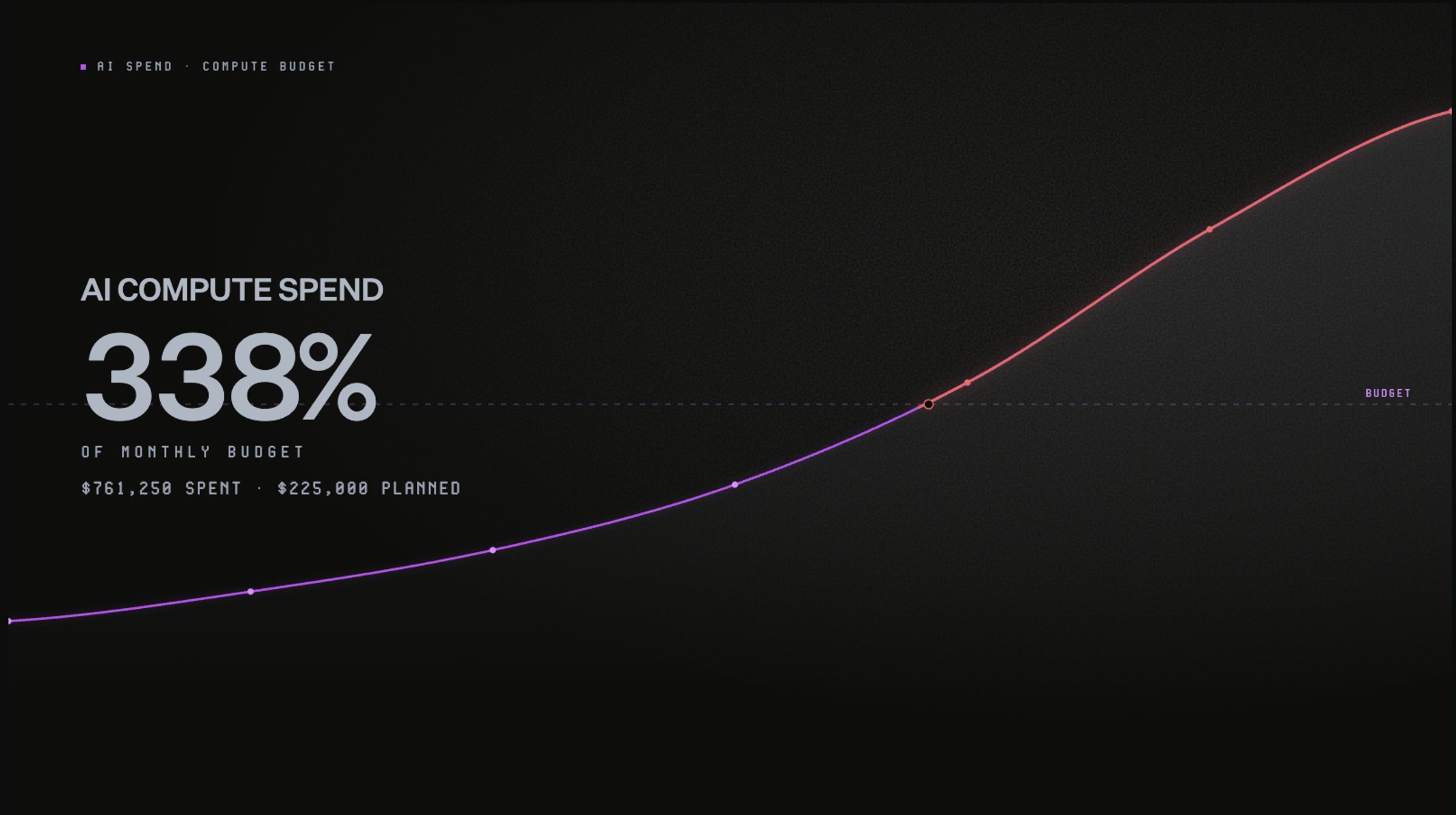
AI costs span cloud infrastructure, model usage, tokens, and data processing. Learn where waste accumulates and how to control spend without limiting performance.
TL;DR
- AI costs span infrastructure, model usage, tokens, data processing, and application workflows. One feature can generate charges across several systems.
- Consumption pricing preserves flexibility, while provisioned capacity can lower unit costs once production demand becomes predictable.
- The most common sources of waste are mixed budgets, oversized models, unnecessary agent calls, and idle infrastructure.
- Teams can reduce spend through model routing, batch processing, prompt caching, workflow guardrails, rightsizing, and continuous monitoring.
- North.cloud connects cloud, AI, and data spend in one financial operating system, helping teams trace costs to workloads, assign ownership, and act before waste compounds.
AI infrastructure costs are rising fast, and most teams can't yet say why.
The pattern is familiar. It's the same one cloud spend set years ago: adoption moving faster than visibility, ownership, or financial control.
The difference is that AI spend spans cloud infrastructure, model and token usage, and data services. Each layer behaves differently, making costs harder to predict and attribute. The result is a widening gap between expected spend and the final bill.
The teams managing these costs well tend to follow three principles:
- Separate research and development from production spending
- Match model capability to the complexity of each task
- Monitor infrastructure, model, and token costs continuously
This guide explains where AI costs originate, why they compound, and which optimization strategies give teams meaningful control.
Why AI spend behaves differently
AI spend does not arrive as one clean line item. It moves across cloud infrastructure, model providers, data platforms, and the applications connecting them.
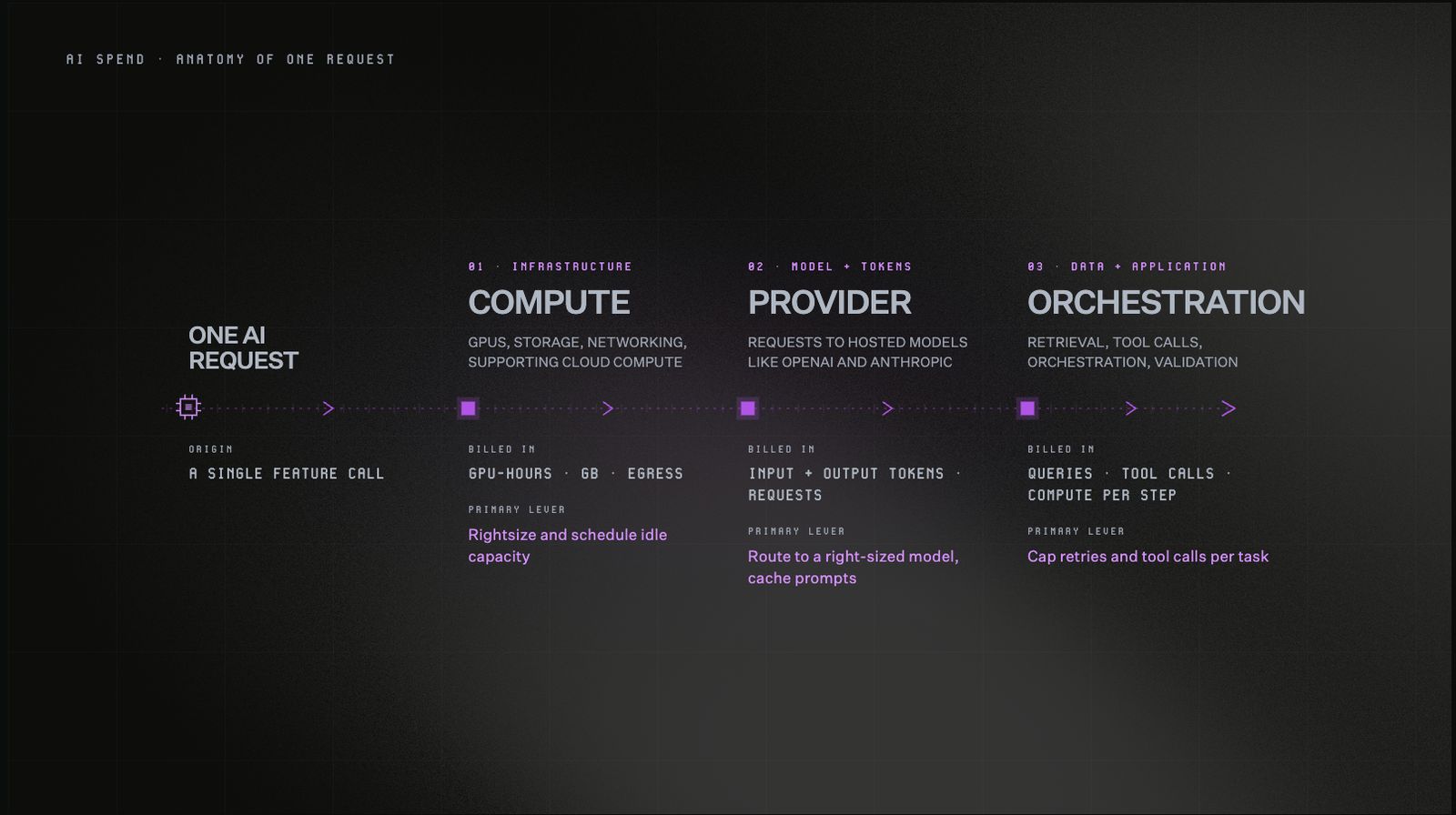
A single feature call moves through infrastructure, model provider, and orchestration layers, each billed differently and each with its own lever for control.
A single feature call moves through infrastructure, model provider, and orchestration layers, each billed differently and each with its own lever for control.
Each system also measures usage differently:
- Cloud providers bill for compute, storage, and networking
- Model providers charge for tokens, requests, or generated outputs
- Data platforms charge for storing, retrieving, and processing context
A single AI feature can generate costs across all three layers. That makes total spend difficult to understand from any one invoice.
Infrastructure costs
The infrastructure layer includes graphics processing units (GPUs), storage, networking, and supporting cloud services.
You might incur these costs when you train, fine-tune, host, or support AI workloads. GPU capacity is often the largest line item, but it rarely operates alone.
Training and inference workloads also depend on data pipelines, orchestration services, storage, and general-purpose compute. Those supporting costs can remain spread across several cloud services.
Infrastructure spend is most visible for teams hosting models themselves. It also supports applications that rely on managed model services.
Model and token costs
Many organizations access models through providers such as OpenAI and Anthropic.
Pricing depends on the provider, selected model, input volume, output volume, and request type. Longer prompts require more processing, while larger responses add further usage.
Image, audio, and video generation may use different billing structures. The cost of two requests can therefore vary even when they support the same feature.
Model usage can also grow directly with product demand, since every new user, feature, and automated workflow can create more requests.
Data and application costs
The application layer determines how infrastructure and model services work together.
Imagine an AI assistant answering a customer’s question. Before producing a response, the application will:
- Retrieve information from a database
- Prepare that information as model context
- Send a request to the model provider
- Call an external tool or service
- Validate the response before returning it
Each of these steps creates a separate charge. So, one single customer request may generate database queries, tokens, networking costs, tool calls, and cloud compute usage.
Agentic workflows can also extend this by coordinating several services within one task. That makes the full cost larger than the model charge alone.
Inference is the recurring cost most companies manage
Most organizations do not train foundation models themselves. Their AI costs usually fall into two more practical categories:
- Fine tuning: adjusting a model once so it performs better on your specific task, before it goes live
- Inference: using that model to answer real requests, every time a user or system calls it
Inference runs for as long as the product stays active. Every user action that touches the model adds to the bill.
For companies relying on third-party models, inference is usually the biggest recurring AI cost. The most common challenge is tying that spend back to the feature driving it.
Why AI costs are hard to forecast and purchase
AI teams often have to pick a pricing model before production demand is clear.
Most initiatives start in research and development, where teams test models, architectures, and use cases before anything reaches production. That testing phase offers only a partial forecast, since production demand is still unsettled at this stage.
This creates a purchasing tension between two reasonable choices: consumption pricing, which preserves flexibility, and provisioned capacity, which can lower unit costs and stabilize performance. The problem is that provisioned capacity only pays off with predictable demand, which is exactly what's missing at this stage.
Research usage rarely predicts production demand
Development workloads are temporary and irregular, since a team might run an intensive test, pause, then swap the model or architecture entirely. Production usage behaves differently. Once live, it stays active and grows alongside user count, feature scope, and request volume.
A successful pilot can scale faster than anyone expected. Another might never reach production at all, and there's often no way to know which outcome is coming.
That unpredictability makes development activity a weak basis for capacity planning. What gets tested during research can look nothing like steady-state demand once a product is live.
Provisioned capacity requires confidence in future usage
Most managed AI services start out with consumption-based pricing, where teams pay for the tokens, requests, or processing they run. It works well early, when workloads are still shifting and flexibility matters more than efficiency.
Usage tends to grow, though, and so does the bill attached to it. That's where provisioned capacity comes in.
Major cloud providers offer teams the option to commit to a defined level of model throughput instead of paying per request, usually at a lower rate and with steadier performance. That commitment takes a different shape depending on the provider:
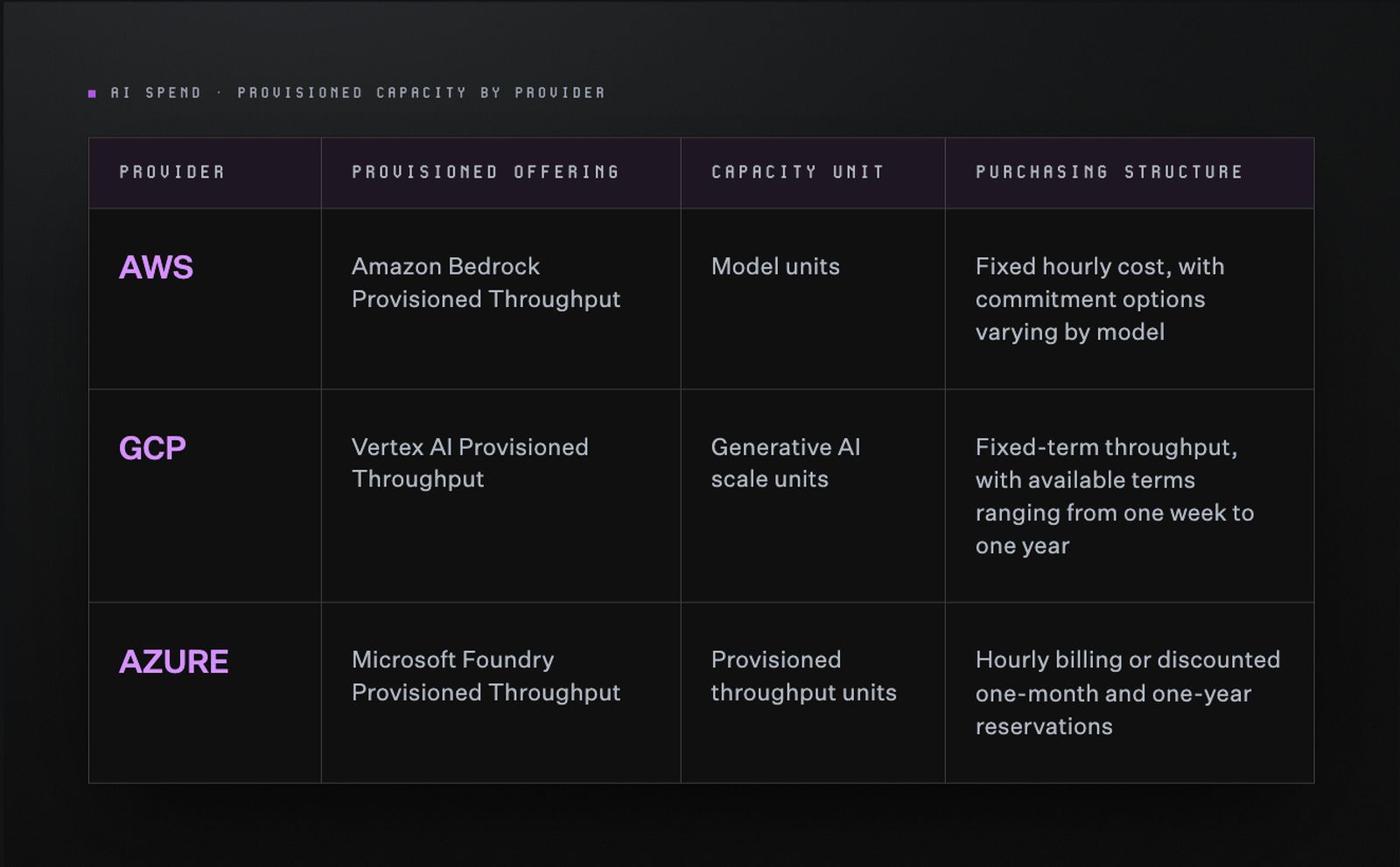
AWS, GCP, and Azure each structure provisioned throughput differently, from commitment length to how capacity is measured.
Committing to this provisioned capacity changes who carries the risk. Under consumption pricing, costs rise if usage rises. Under provisioned capacity, the risk flips: teams can end up paying for throughput nobody used.
Whether the lower rate pays off depends entirely on-demand. Teams need enough usage history behind them to know what production actually needs, and to commit with real confidence instead of a guess.
Best practices for managing AI spend
AI cost control works best when it begins before usage reaches production scale.
Visibility drives AI cost control, not restriction. Teams should be able to trace spend to the workload behind it and judge whether that spend earns its keep.
North brings cloud, AI, and data spend into one financial operating system. That connects infrastructure costs with model, token, and data usage, then traces that spend back to the workloads and teams behind it.
The practices below work on their own. North supplies the cost signals that make applying them easier across every layer.
1. Separate experimental and production spend
Research and development workloads run temporary and uneven, while production workloads stay continuous and grow with adoption.
Keeping both in one budget makes it harder to distinguish planned testing from recurring operating costs, since a short experiment can read as normal product usage and a real production increase can get dismissed as another temporary spike.
Teams should separate them through:
- Distinct budgets or environments
- Clear workload owners
- Expiration dates for temporary resources
- Production forecasts based on observed demand
How North helps: Coststreams organizes spend around teams, products, and environments without requiring tags, giving each workload a clearer financial boundary and owner.
2. Track the full cost of each AI feature
A model invoice captures only one part of the cost. One feature may also generate cloud compute, storage, data retrieval, networking, and tool usage. Teams need to connect those charges before calculating the true cost of a request, workflow, or completed task.
A useful cost view should answer:
- Which model generated the usage?
- What infrastructure supported the request?
- Which data platforms were involved?
- Which feature, team, or customer created the spend?
- What did the completed task cost?
How North helps: North’s integrations library brings spend from platforms such as OpenAI, Anthropic, and Snowflake into the same system as cloud infrastructure costs.
TokenFlow, with early access opening soon currently in beta, can add more context around token and model usage by connecting requests to the team members, features, and workflows behind them. This can help teams move beyond provider totals and better understand what is driving AI spend. If managing token spend is something you’ve been looking for, join the waitlist here.
3. Use the right model and processing method
The most capable model isn't always the best fit. Frontier models earn their cost on complex reasoning or high-value outputs, where getting it right matters more than getting it fast. Routine work like classification, extraction, summarization, and formatting rarely needs that level of capability, and using one model for everything raises the average cost per request as usage scales.
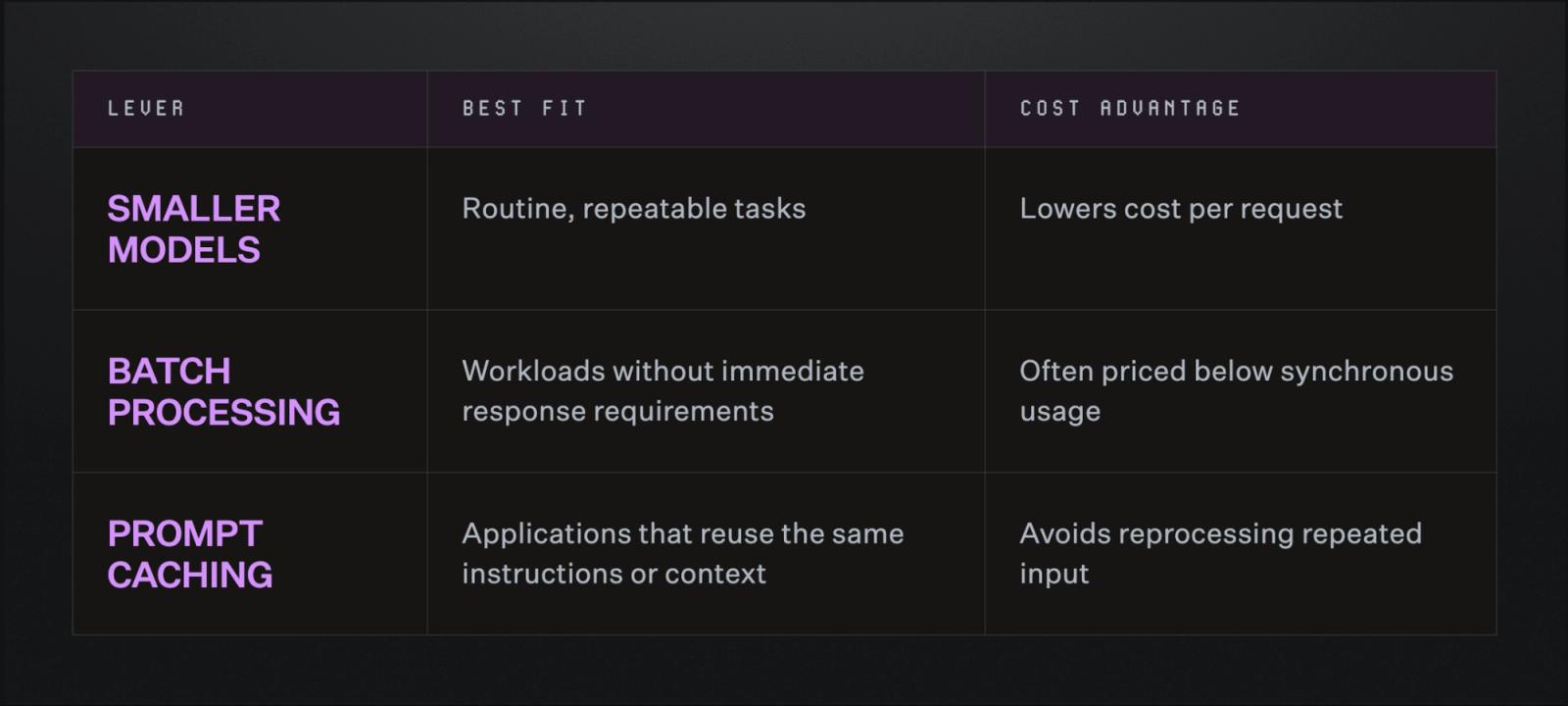
The different types of processing methods matter when it comes to AI spend.
Processing method matters just as much:
- Prompt caching: reduces cost when requests reuse long system prompts, instruction blocks, or document sets
- Batch processing: lowers cost for workloads that don't need an immediate response. OpenAI's Batch API, for example, prices batch requests at half the cost of standard synchronous ones
Before choosing a setup, compare:
- Required output quality
- Response-time requirements
- Cost per successful result
- Repeated context across requests
- Whether requests can run asynchronously
The goal is to pay only for the capability and speed each task actually requires.
4. Put limits around agents and automated workflows
Automated workflows can turn one request into several billable actions. An agent may call a model, retrieve data, use a tool, check the result, and retry, and each action can add token, data, or infrastructure cost. Some repetition improves reliability, but waste begins when the workflow repeats work without improving the final output.
Teams should define:
- Retry limits
- Clear stopping conditions
- Maximum tool calls
- Context and output limits
- Fallback behavior when a step fails
Measuring cost per completed task, not per model call, makes it easier to see whether those limits are actually working.
5. Rightsize the infrastructure beneath AI
AI infrastructure should reflect observed workload demand, not anticipated peaks. A GPU instance might stay active well after training finishes, and production capacity may be sized for peaks that rarely actually occur. These resources rarely trigger an obvious alert. They remain valid workloads, but their utilization no longer justifies their cost.
Teams should review:
- Whether capacity scales down when demand falls
- Whether temporary resources are removed after use
- Whether workloads are sized around observed demand
- Whether every resource has a clear owner
- Whether utilization supports the current cost
Rightsizing should follow workload behavior, not the maximum capacity a team might need later.
How North helps: North’s Rightsize capability identifies oversized and underused cloud resources, including infrastructure that supports AI workloads. Teams can see where capacity no longer matches demand and prioritize changes without relying on manual reviews.
Read our blog on overprovisioned resources for a deeper look into how to rightsize without the risk.
6. Assign ownership before spend grows
A cost cannot be managed well when nobody knows who owns it.
So, every recurring AI workload should connect to:
- A team
- A product or feature
- An environment
- A budget
- A business outcome
That ownership gives engineering, product, and finance a shared basis for decisions.
How North helps: Coststreams maps cloud, AI, and data spend to the business dimensions behind it. Teams can review costs by product, customer, department, or environment instead of relying only on provider invoices.
7. Monitor continuously, not after the invoice arrives
Monthly invoices show what already happened. They do not help teams stop waste while it is accumulating.
Continuous monitoring closes that gap.
Teams should watch for:
- Sudden changes in provider spend
- Unexpected infrastructure growth
- Token usage outside normal patterns
- Budget movement by team or workload
- Rising cost per feature or completed task
How North helps: North’s Anomalies capability monitors spend for meaningful changes and surfaces the likely cause, cost impact, and affected workload.
Noros, North’s FinOps Agent, then lets teams investigate those changes in plain language. Teams can ask what drove an increase, which workload owns it, and how the current month is tracking.
Keep AI costs visible with North
AI costs become harder to manage when infrastructure, model usage, and data spend live in separate systems.
Teams need enough visibility to see what each workload costs and catch waste before it compounds.
North brings cloud, AI, and data spend into one financial operating system. Teams can connect provider usage with the infrastructure behind it, assign ownership, investigate changes, and act early.
That creates a stronger operating model for AI. Engineering can move quickly, finance can forecast with more confidence, and leadership can judge spend against the outcomes it supports.
Explore North's free tier to see how teams bring cloud, AI, and data spend into one view.