
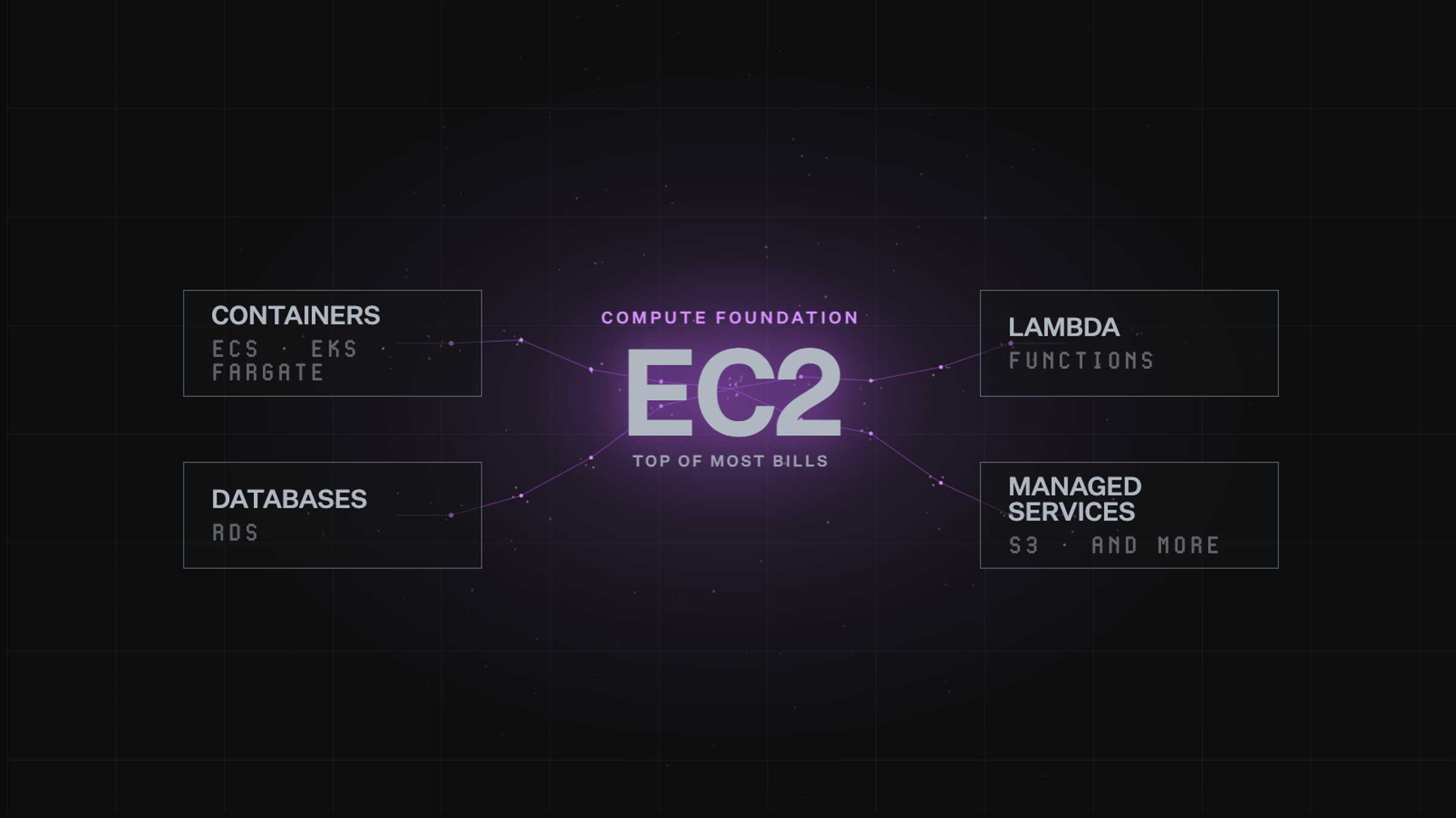
EC2 cost optimization means keeping instances the right size, running only when needed, and priced through the right model. This guide covers the cost drivers, the strategies that hold up, and how the best teams approach the problem.
TL;DR
- EC2 cost optimization is the continuous process of confirming instances are needed, sized correctly, and priced through the right model.
- The three variables are interconnected: skipping ahead in this order locks in savings on the wrong baseline.
- Savings Plans and Reserved Instances save up to 72%, and Spot Instances up to 90%, but each fits a different kind of workload.
- Data transfer is the cost most teams miss, since it accumulates quietly and can rival compute costs when services route inefficiently.
- North.cloud applies commitment optimization, rightsizing, and anomaly detection continuously, so teams catch EC2 waste before it surfaces in the monthly bill.
Amazon Elastic Compute Cloud (EC2) cost optimization seems simple, until the bill proves otherwise. The common fixes are well known:
- Turn off idle instances
- Rightsize the ones that are too large
- Buy commitments for workloads that run consistently
Yet the bill keeps climbing anyway.
The reason is structural, not a knowledge gap. EC2 is not just one cost to manage. It's the foundation almost everything else runs on:
- Containers
- Databases
- Lambda functions
- Most other managed services
Nearly every Amazon Web Services (AWS) workload traces back to EC2 underneath it. That's what puts EC2 at the top of most bills. It's also what makes it the hardest cost to untangle.
This guide covers what drives EC2 costs at each layer. It also covers which fixes hold up over time, and how teams that manage this well actually think about the problem.
Why EC2 is the hardest cloud cost to get right
EC2 cost optimization is a continuous process, not a one-time cleanup.
This means:
- Instances run only when needed
- Instances are sized to match real demand
- Instances are priced through the most cost-effective model
The difficulty is that these three variables are interconnected. Fixing one out of order can undercut the other two. The problem gets clearer when broken into three diagnostic questions, each one building on the last.
Are you using the machine at all?
This is the most basic question, and the most commonly skipped. Before asking if an instance is the right size, confirm it needs to run at all.
Common sources of this kind of waste include:
- Forgotten test environments
- Instances spun up for a sprint and never shut down
- Infrastructure that outlasted the urgency that created it
These are the most straightforward sources of EC2 waste. They persist because nobody had clear visibility into what was still running.
Are you using the right size?
Once an instance is confirmed to be in genuine use, the next question is sizing. This is where most EC2 optimization discussions focus, for good reason. An instance provisioned generously at launch tends to stay that size long after usage patterns settle.
Cloud instances work a lot like office space here. A team of three paying for a floor built for twenty is wasting resources with no return. A team of twenty crammed into space built for five runs into real capacity problems.
The right size is specific to the workload. It also changes as the workload evolves.
Are you paying the right rate?
Even a correctly sized instance that runs only when needed can be badly overpriced if the payment model hasn't been thought through. AWS offers three ways to pay for EC2, and the gap between them is significant:
AWS offers three ways to pay for EC2:
- On-Demand charges full price with no commitment
- Savings Plans (SP) and Reserved Instances (RI) offer up to 72% off in exchange for a one or three-year commitment
- Spot Instances offer spare AWS capacity at up to 90% off but can be reclaimed by AWS at any time
Each model suits a different type of workload. Choosing the wrong one for a stable, long-running workload is one of the most common sources of avoidable EC2 spend.
Why the order matters
Each question builds on the one before it. The sequence matters as much as the questions themselves.
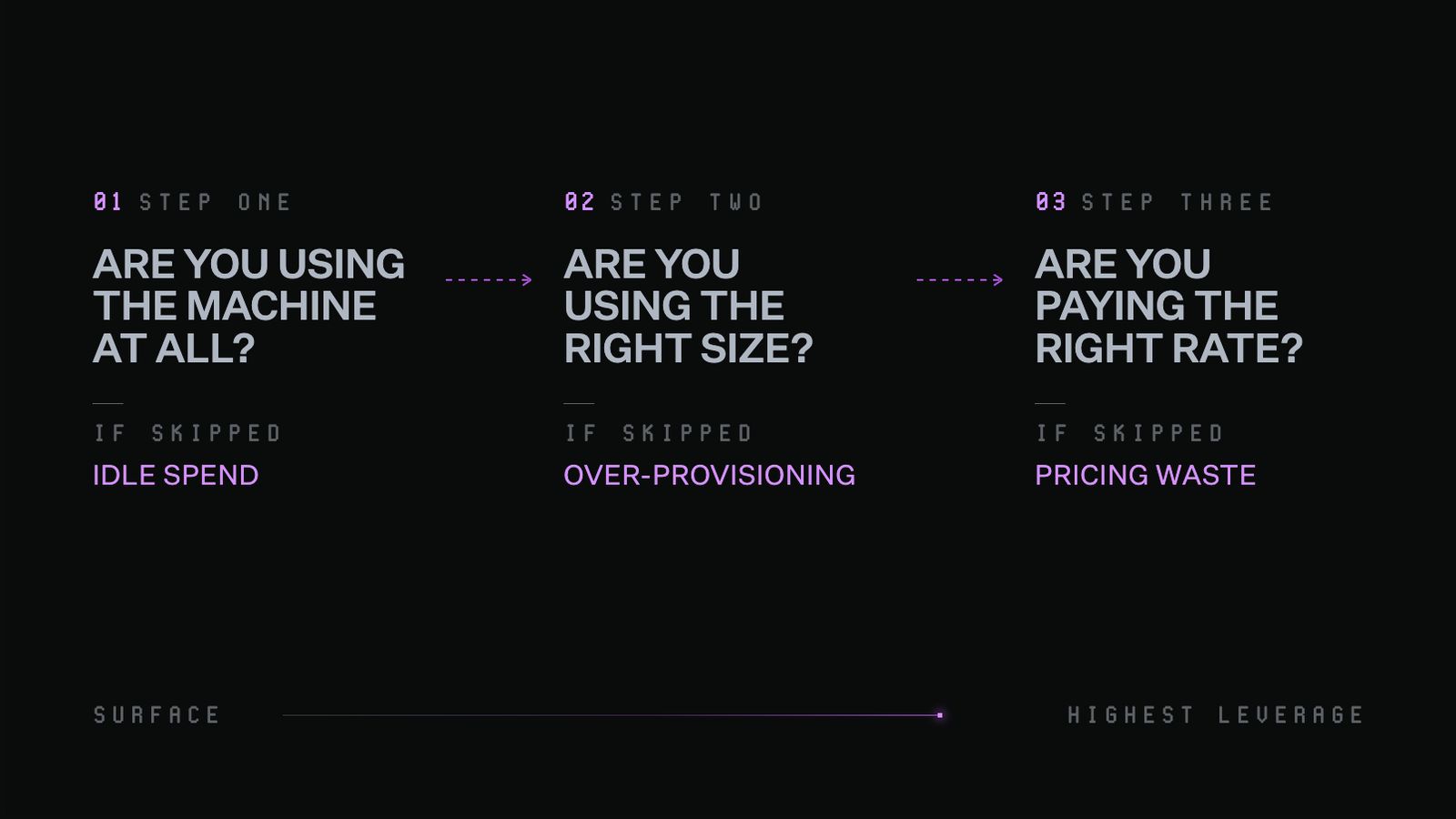
Three diagnostic questions for EC2 cost optimization, each building on the last. Skipping any one of them means the savings from the next step are built on the wrong foundation.
The commitment layer: EC2's biggest savings opportunity
The pricing model decision is where the most money is saved or lost. It's also where teams tend to have the least structured approach.
The challenge isn't that the options are unclear. It's that choosing between them means predicting the future, and most cloud environments change faster than a multi-year commitment can account for.
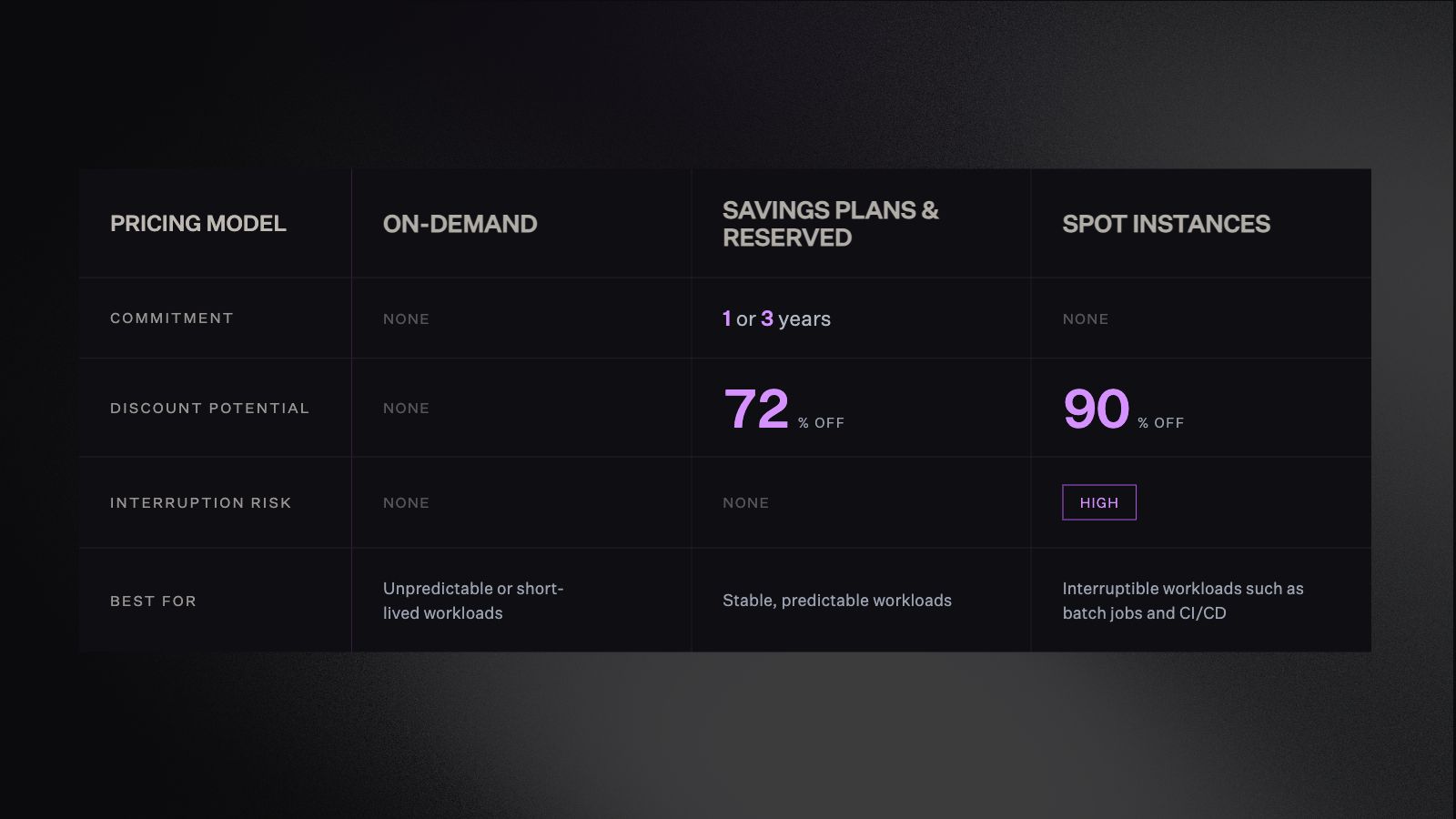
The three EC2 pricing models compared across commitment, discount potential, interruption risk, and ideal workload type. The right model depends on how predictable, flexible, and interruption-tolerant the workload is.
The challenge with long-term commitments
Committing to EC2 capacity is a lot like signing a multi-year office lease before knowing headcount. If the team grows, the space fills up and the commitment pays off. If the team shrinks mid-lease, the organization keeps paying for empty desks.
Unlike an office lease, unused reserved EC2 capacity can't be subleased or transferred.
Growth plans change. Teams restructure. Products pivot. Workloads shift in ways that are hard to predict twelve months out, let alone thirty-six. The math on committed pricing is compelling, and the risk of committing to the wrong baseline is real.
Where commitment strategy tends to get complicated
Most teams navigate this decision thoughtfully, but tend to land in one of two situations:
- Staying on On-Demand pricing for workloads that have run stably for months or years, because the lock-in feels hard to justify given how much the environment might change
- Purchasing SPs or RIs at the current infrastructure baseline before rightsizing, which locks in a discount on capacity the workload may not actually need
Both situations make sense given the information available at the time. The problem is that waiting on commitments, or committing at the wrong baseline, compounds quietly over time.
Instance sizing: The right fit, not the smallest size
Rightsizing means matching an instance type and size to the workload it runs. The goal isn't the smallest possible instance, it's the right one. That distinction matters more than it sounds.
Downsizing a resource that can't handle the reduction creates its own problems. Performance issues and reliability risks often cost more to fix than the original savings were worth.
How to tell if an instance is oversized
The signal is in the usage data. CPU utilization, memory pressure, and network throughput over a meaningful window tell a clearer story than any single snapshot.
- A machine running at 8% CPU for weeks with no spikes is a reasonable candidate for downsizing
- An instance hitting 90% regularly is undersized, and poses a reliability risk even without an incident yet
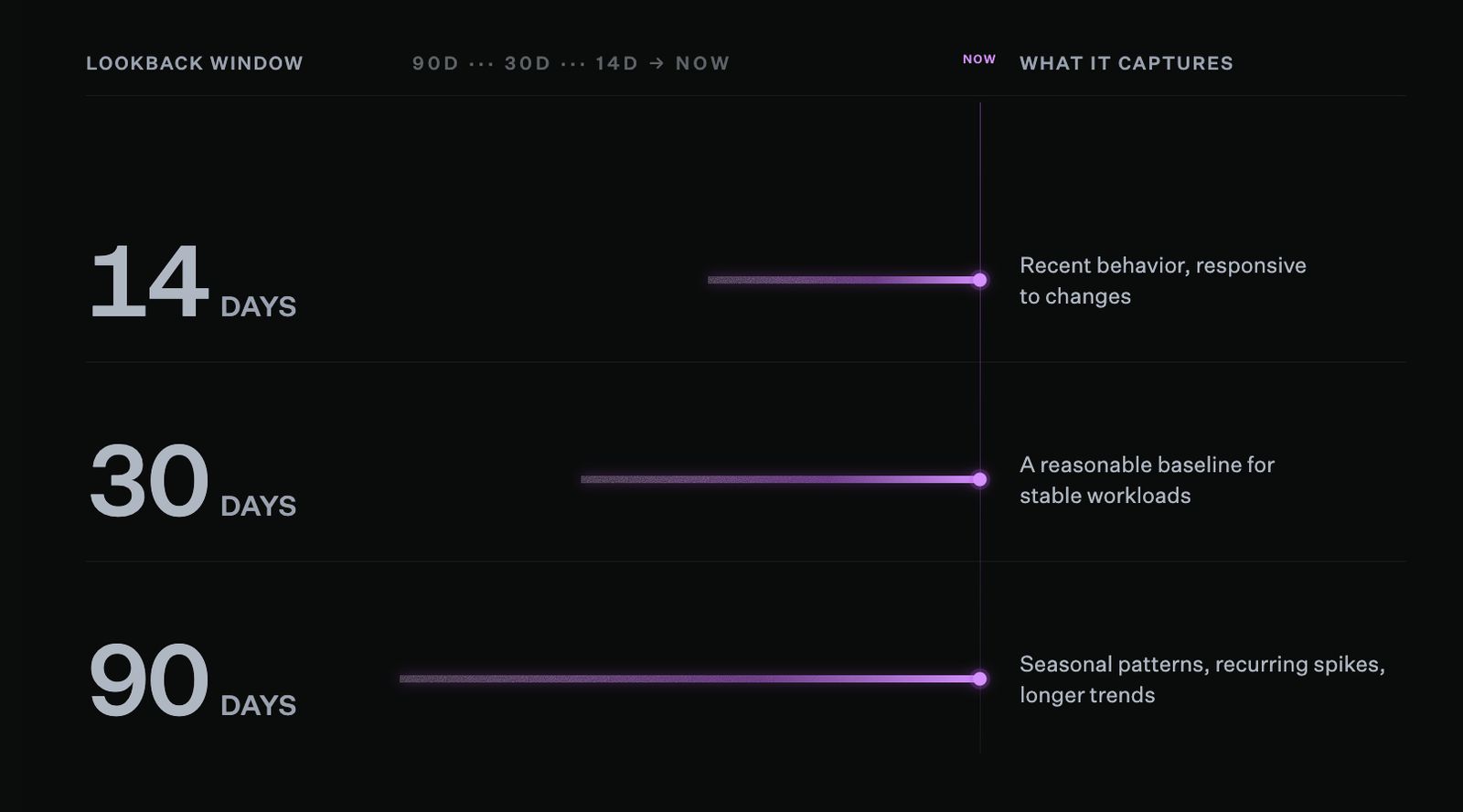
How long you look back shapes what you see. The right lookback window depends on how variable your workload is.
A 30-day average shows what a resource looks like under normal conditions. And a 90-day view captures seasonal patterns, traffic spikes, and anomalies too.
The more variable the workload, the longer the window needed for a confident sizing decision.
The headroom principle
In production environments, some overprovisioning is deliberate, and that's sound engineering judgment. Leaving room for unexpected load spikes makes sense. A production database and a development environment used a few times a day don't need the same utilization target.
The real issue isn't overprovisioning at launch, before usage data exists. It's when that initial decision never gets revisited.
An instance sized generously for a new service in Q1 tends to stay that size through Q4. By then the workload has stabilized, and a smaller configuration would serve it just as well. Overprovisioning that was once intentional becomes quiet waste once the original rationale no longer holds.
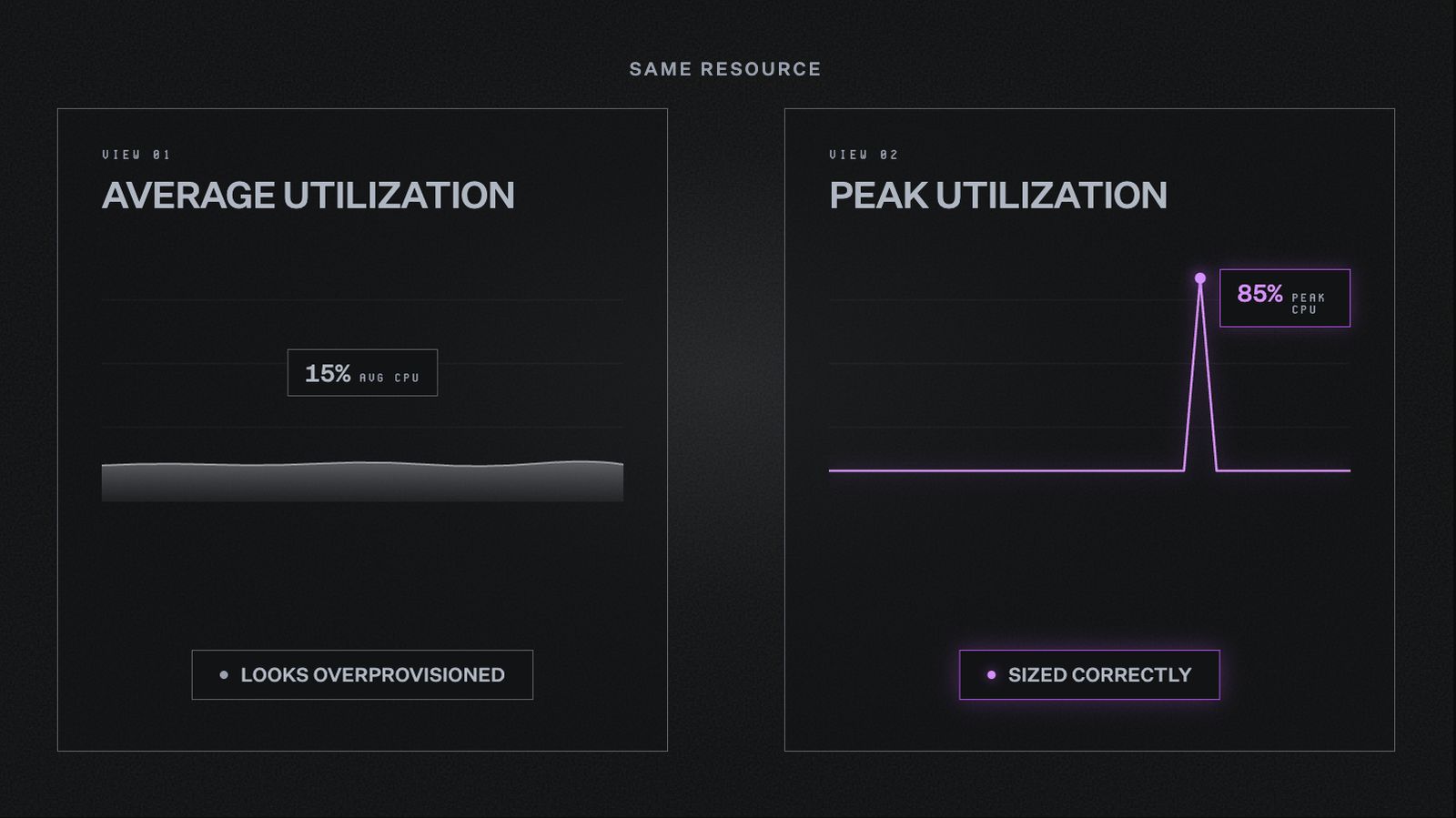
The same EC2 instance tells two different stories depending on which metric is used. Average utilization alone is not enough to make a confident rightsizing decision.
For a deeper look at distinguishing intentional overprovisioning from the kind worth addressing, this guide on overprovisioning and rightsizing covers that in depth.
Choosing the right instance family
Sizing isn't only about going up or down within the same instance type. Choosing the right family for the workload matters just as much, and mismatches here tend to go unnoticed. Utilization numbers alone don't reveal whether the right kind of capacity is in use.
- A memory-optimized instance running a compute-heavy job leaves memory idle while the CPU strains
- A compute-optimized instance running a memory-intensive database creates the same problem in reverse
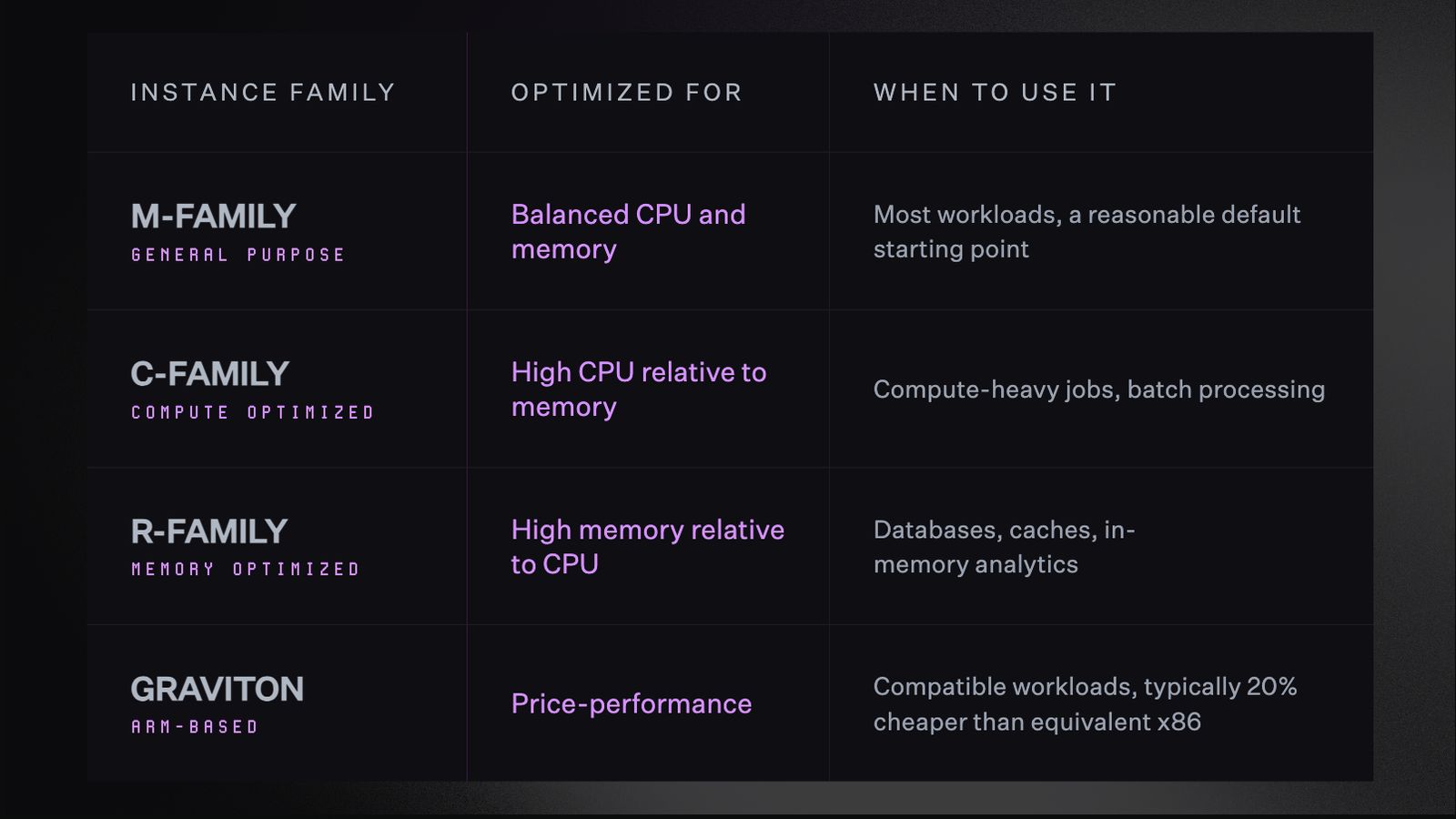
Choosing the right instance family for the workload often delivers more value than simply downsizing within the same one.
Graviton-based instances deserve particular attention when evaluating instance families. For compatible workloads, the price-performance improvement is meaningful and doesn't require architectural changes to capture.
The cost nobody expects: Data transfer
Most EC2 optimization conversations focus entirely on compute. Which instances are running, how large they are, what pricing model covers them.
Data transfer sits outside that frame almost entirely.
Why data transfer is easy to miss
Compute costs are visible and attributable, tied to decisions engineers remember making. Transfer costs accumulate from architectural patterns set up once and never reconsidered. They don't announce themselves until someone looks at the right part of the bill.
AWS charges for data the moment it crosses a boundary:
- Between regions
- Between Virtual Private Clouds (VPCs)
- Out to the internet
A useful way to picture this is toll pricing on a commute. Traffic that stays within the city moves freely, but crossing into another zone triggers a charge in each direction.
The real problem isn't the cost of crossing. It's that many of these crossings are avoidable. Services that could communicate directly are instead taking the long route, paying at every boundary along the way.
Why this matters for EC2 specifically
EC2 instances are often the hub other services route through. Relational Database Service (RDS) databases, Simple Storage Service (S3) buckets, Lambda functions: when these communicate through inefficient paths, transfer costs can rival compute costs themselves.
For teams without a clear picture of their full AWS bill, data transfer is consistently where the largest surprises live.
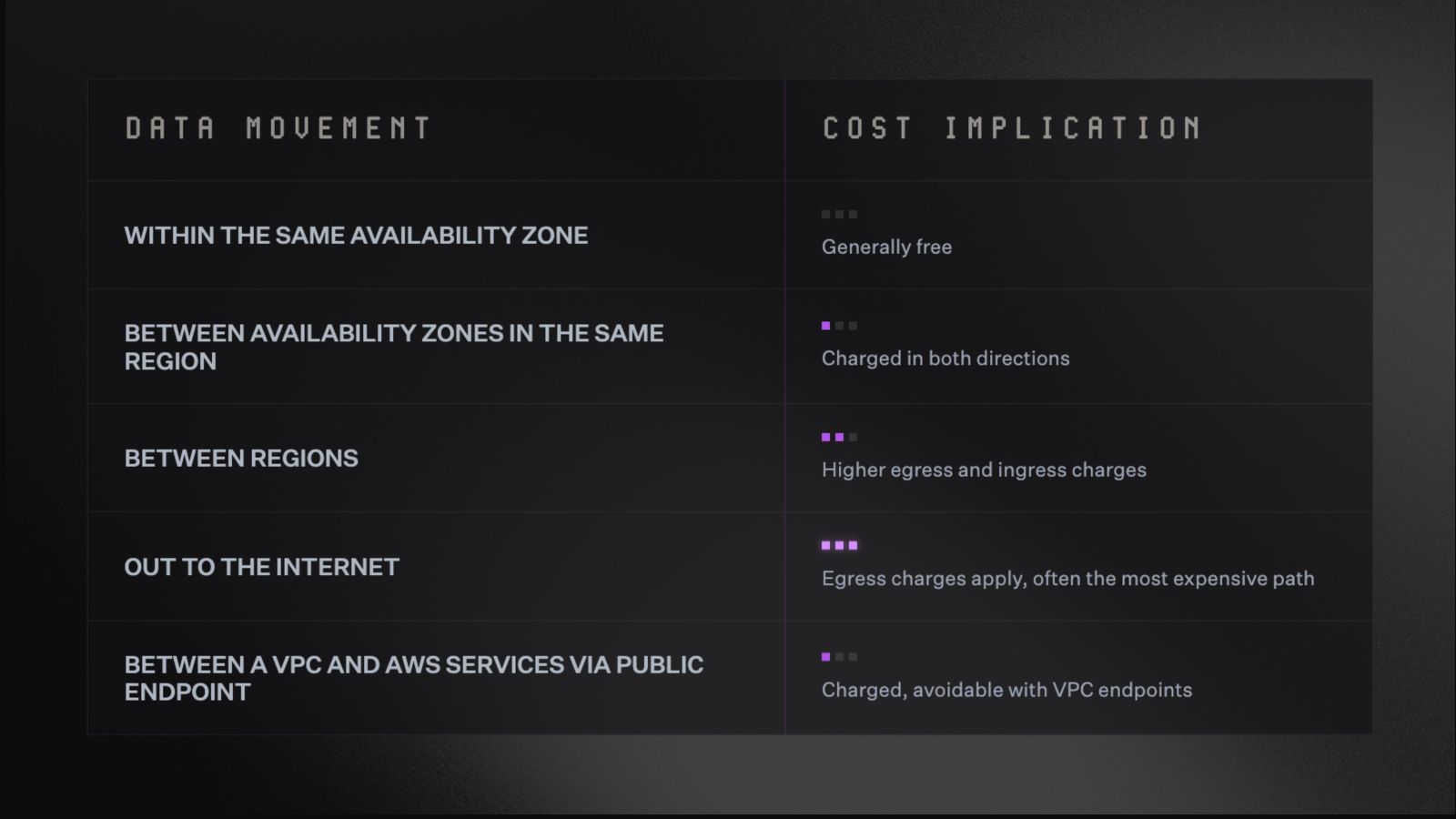
AWS charges for data the moment it crosses a boundary. Where data travels determines what it costs.
What to do about it
Reducing data transfer costs is primarily a code and architecture decision, not a configuration one. Services that communicate frequently should live in the same network. The farther data travels between services, the more it costs.
Practically, this means:
- Keeping services that talk to each other in the same Availability Zone where possible
- Using VPC endpoints to route traffic to AWS services privately, rather than over the public internet
- Reviewing service communication patterns to catch routing that crosses regions unnecessarily
- Consolidating workloads with high inter-service traffic into the same network boundary
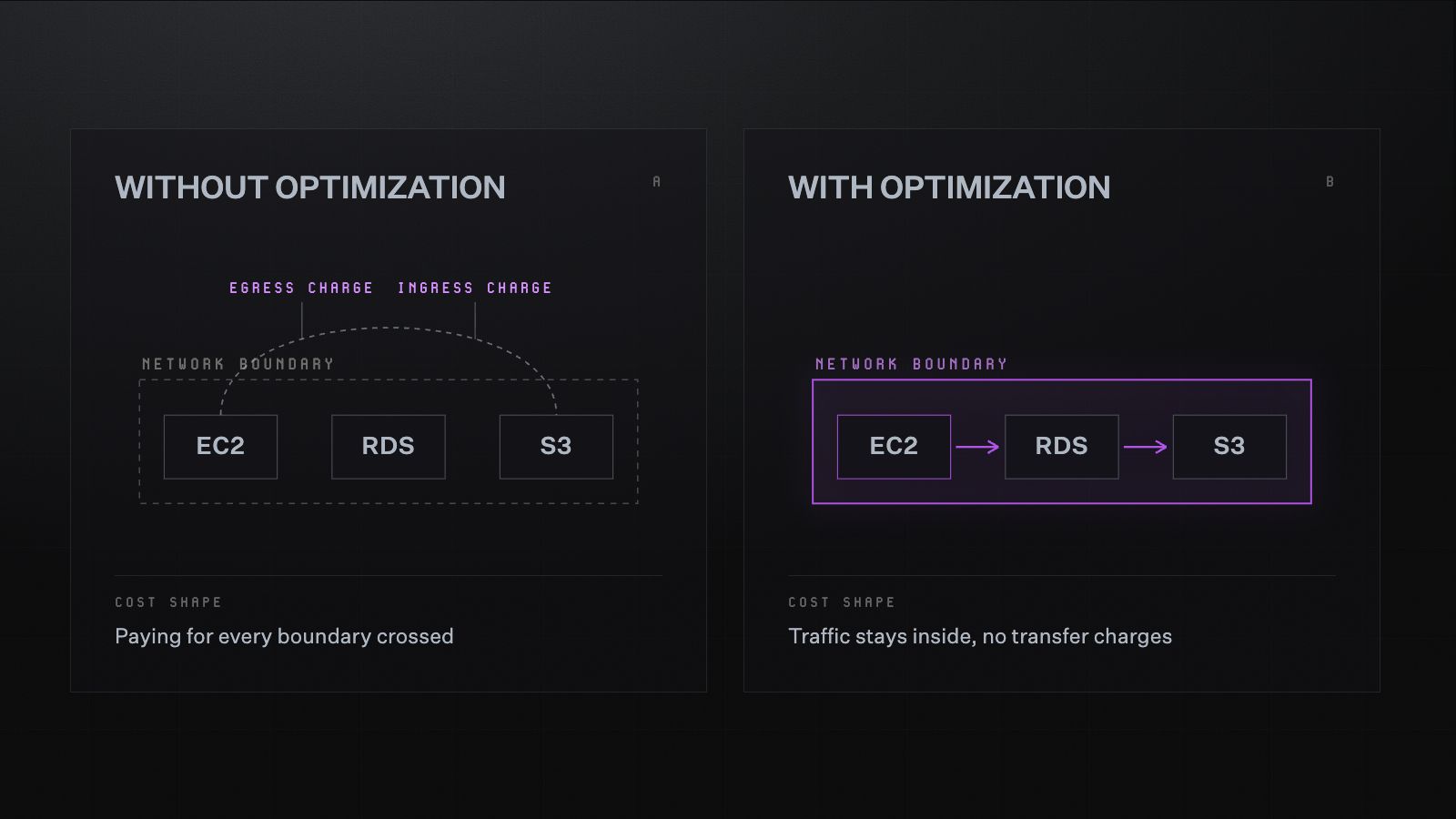
When services route data outside the network boundary unnecessarily, AWS charges for every crossing. Keeping services that communicate frequently within the same network eliminates those costs entirely.
Best practices for reducing EC2 costs
Cost visibility is built into how high-performing engineering teams operate. It isn't a side project running parallel to the real work.
The practices below reflect that. They're habits, not a one-time exercise.
Start with inventory and separate signal from noise
Before optimizing anything, it helps to know what's actually running. Not at the account level, but at the resource level.
- Which machines are active
- What services depend on them
- What purpose each one serves
A $10,000 monthly EC2 cost that's fully explained is a different problem than a $10,000 cost nobody can account for. Once the full picture is clear, some costs map cleanly to a business function and scale with the workload they support.
The costs worth investigating are the ones that don't map to anything clear. Optimization without that inventory is guesswork, and it tends to produce savings in the wrong places.
Match scheduling to actual usage patterns
Development and test environments don't need to run around the clock. Nights and weekends account for roughly 65% of the week.
For environments only used during business hours, most of that runtime has no corresponding value. Scheduling instances to run only when needed is one of the simplest ways to cut EC2 costs, with no change to the underlying infrastructure.
Treat rightsizing as a continuous process
EC2 usage changes constantly. A workload sized correctly six months ago may look very different today, and decisions made against stale data carry more risk than they appear to.
Analyzing usage patterns on an ongoing basis, rather than quarterly, is what keeps rightsizing recommendations reliable. The signals worth tracking continuously:
- CPU utilization trends over time
- Memory pressure during peak periods
- Whether instance behavior has shifted since the last sizing decision
Commit to the right baseline, not the current one
The sequencing covered in the commitment section applies here too. Understand the workload first, rightsize against real usage data, then commit to that validated baseline.
Where possible, pooling commitments across teams or accounts, rather than buying them in isolation, gives organizations more flexibility to adjust coverage as workloads shift.
Build cost ownership into the team structure
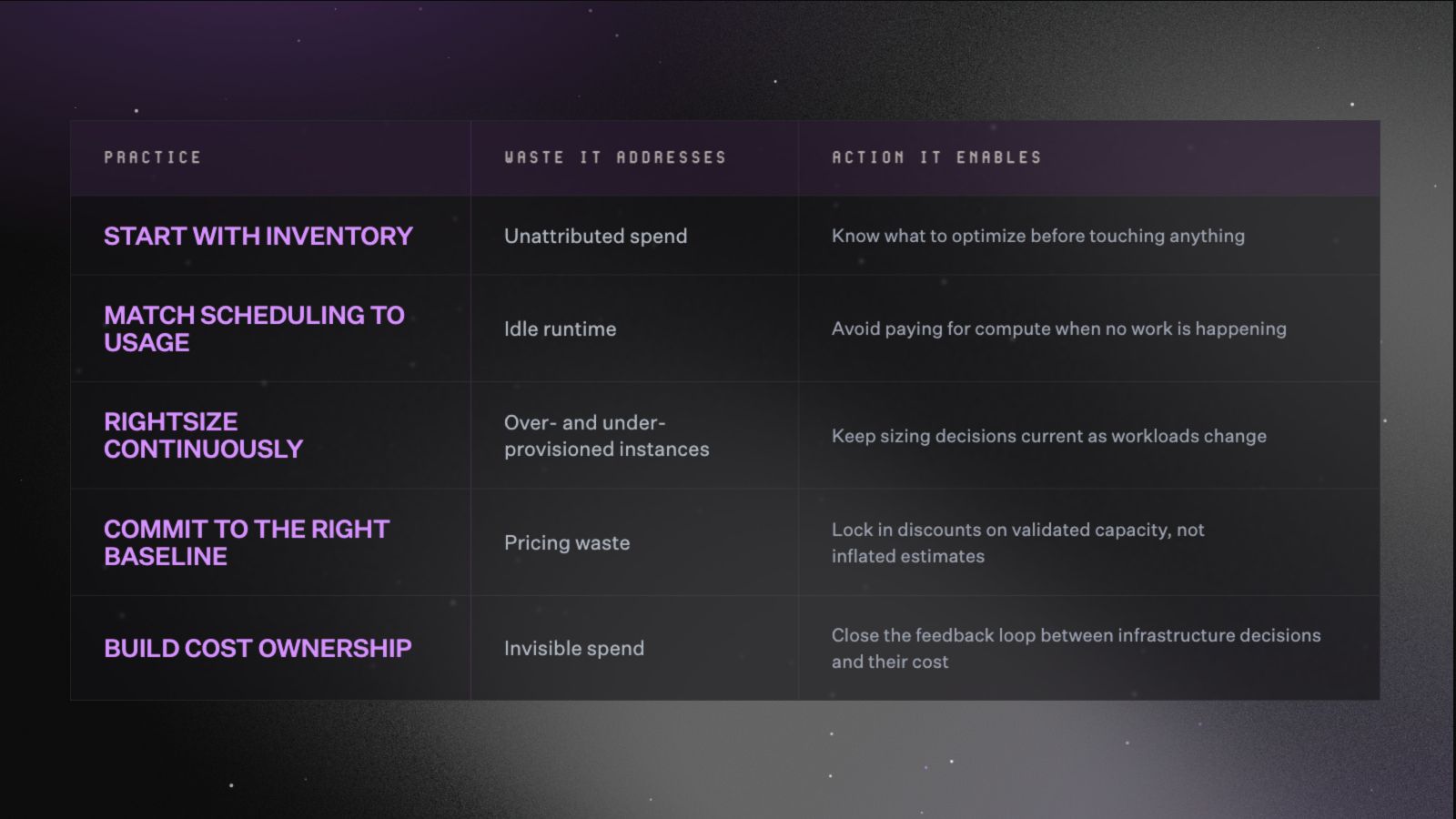
Five practices worth building into how the team operates, each targeting a different source of EC2 waste.
EC2 costs are hard to manage when they belong to everyone in general and nobody in particular. Teams that stay on top of it treat cost visibility the way they treat performance monitoring, visible continuously to the people making infrastructure decisions, not reported to finance once a month.
When engineers can see what the services they own actually cost, the feedback loop that drives good infrastructure decisions closes on its own.
How to reduce EC2 costs with North: A step-by-step walkthrough
The AWS bill arrives, and EC2 is the loudest line item again. The number is higher than last month, and nobody made a single decision that explains it.
Instead of opening Cost Explorer and working backward through weeks of usage data, here's what that same investigation looks like inside North.
Step 1: The rate savings surface immediately
Within minutes of connecting the AWS account, North scans historical usage and finds a common, expensive pattern. A significant share of EC2 spend is billed at On-Demand rates for instances that have run continuously for months.
These are workloads stable enough to commit to, but nobody pulled the trigger because the lock-in felt risky. North's Coverage feature solves this with two engines, depending on who holds the contract:
- Flexbot captures the savings of a long-term commitment with month-to-month flexibility, adjusting coverage continuously instead of locking into a fixed term. It runs on North-owned accounts.
- Autobot ladders in commitments incrementally, adjusting them as usage shifts instead of betting on a multi-year term. It runs on customer-owned accounts.
For most teams, this step alone brings EC2 spend down by up to 51%.
Step 2: The environment comes into focus
Twenty-four hours later, Rightsize has analyzed every EC2 instance in the account. The dashboard shows a clear picture:
- 66 instances are overprovisioned
- 26 are underprovisioned
- One instance has sat idle for weeks without anyone noticing
The highest-impact recommendation is an instance running at consistently low CPU utilization. Rightsize flags it, explains why, and quantifies the savings. From the dashboard, the recommendation can be sent to the team that owns it via Jira, Slack, or email, with full context attached.
Step 3: A spike appears before it becomes a surprise
A few days later, something shifts. EC2 spend starts climbing in a way that doesn't match any planned work. North's Anomalies catches it the same day, flagging the increase at the resource level with a timestamp, a severity rating, and the specific instance driving the change.
It turns out a workload scaled up during a traffic spike and never scaled back down. The team gets notified immediately, with enough context to understand what happened and fix it.
Without that visibility, the same spike would have shown up as an unexplained line item weeks later.
Step 4: The CFO asks a question
Later that week, a message arrives from finance. EC2 costs are pacing higher than last month, and they want to know why. Instead of scheduling a meeting or pulling a manual report, the engineer opens Noros and asks directly: "Why is EC2 spend up this month?"
The response comes back in seconds.
Noros identifies:
- The specific workload driving the increase
- The resources involved
- The cost impact
It then surfaces three recommended next steps. The answer that would have taken an engineer hours to piece together manually is ready to share with finance in a single conversation.
Step 5: Cost becomes part of how the team operates
With spend visible at the team level through Coststreams, EC2 costs stop being a monthly surprise nobody can fully explain. Engineers see what the services they own cost to run. Finance sees spend by business unit without waiting on a report.
The investigation that started with a high bill becomes the foundation for a practice that keeps it under control.
Start optimizing EC2 costs with full visibility
AWS provides native tools for EC2 cost management, and they are genuinely useful:
- Cost Explorer shows historical spend
- Compute Optimizer surfaces rightsizing recommendations
- Trusted Advisor flags idle resources
The gap is that all three are retrospective. They tell you what happened, not what's happening now.
None of them route a finding to the person who can fix it.
EC2 cost is a layered problem. Teams that manage it well treat optimization the way they treat performance monitoring.
Something running continuously in the background, not something that gets a calendar invite once a quarter.
Maintaining that discipline has increasingly become a tooling problem rather than a personal one. North identifies EC2 optimization opportunities continuously, from commitment coverage gaps to oversized instances to spend anomalies, so teams aren't discovering waste in the monthly bill.
Explore North's free tier to see what your EC2 environment looks like with that visibility in place.