
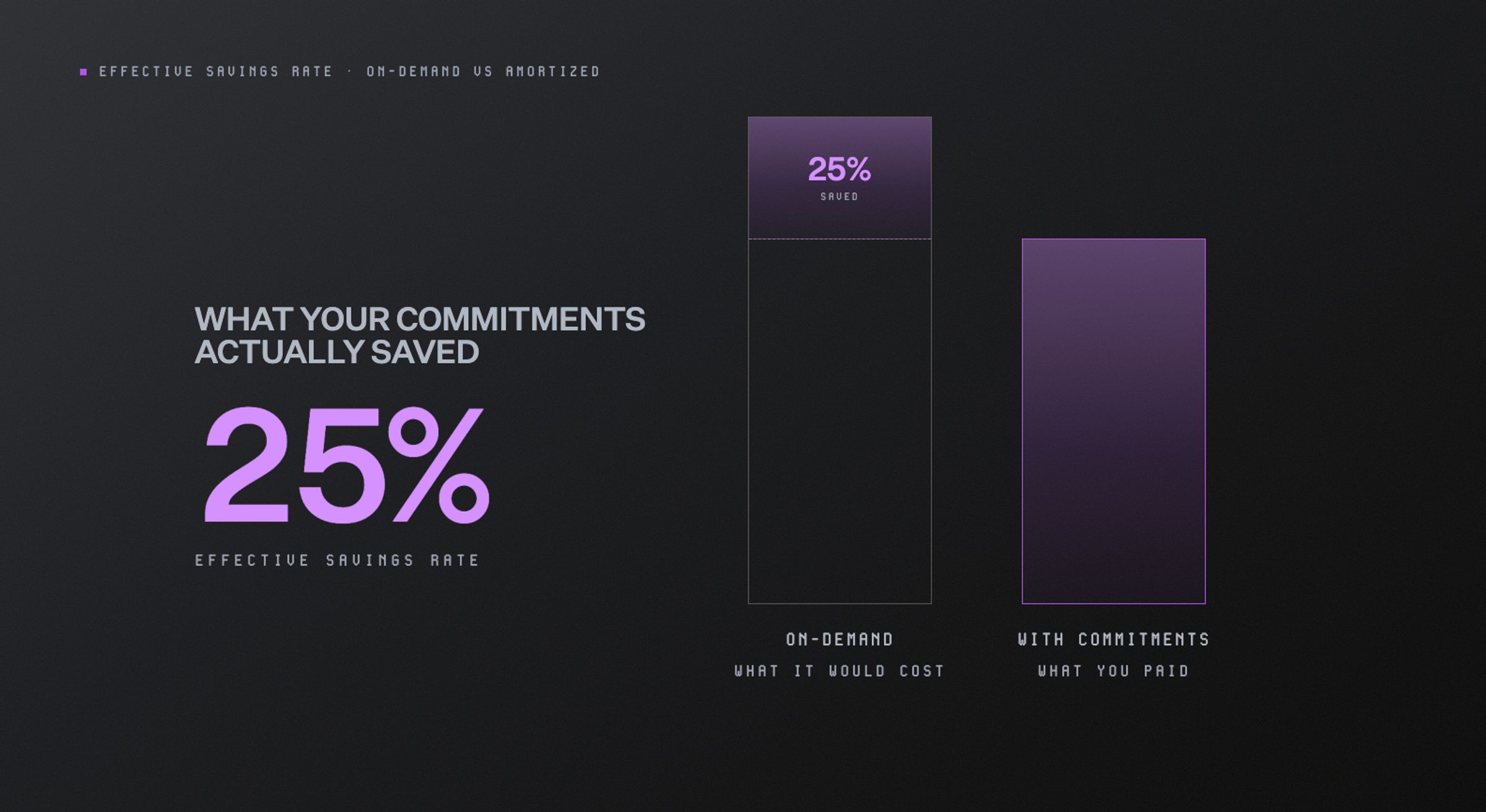
Effective Savings Rate measures realized cloud commitment savings against on-demand pricing. Learn how to calculate ESR, understand it, and improve performance without overcommitting with North.cloud.
TL;DR
- Effective Savings Rate (ESR) measures how much commitment-covered usage saves compared with on-demand pricing.
- ESR is most useful alongside coverage and utilization, which explain why savings rise or fall.
- Improving ESR requires stable baseline usage, well-matched commitments, and regular adjustment as infrastructure changes.
- ESR measures rate optimization, not total cloud efficiency, so it does not capture every saving from rightsizing, scheduling, or Spot usage.
- North.cloud maps ESR to a service-specific FinOps Score from zero to five. Noros, North’s AI Agent, explains what is influencing performance, while Flexbot and Autobot help keep commitments aligned with changing usage.
If you manage cloud costs, you’ve probably seen a bill that looks healthy at first glance. The discounts are there, your commitments are active, and coverage looks solid. But one question is often harder to answer: how much did those commitments save?
Effective Savings Rate (ESR) gives you that answer.
ESR compares your discounted cloud cost with what the same usage would have cost at the regular pay-as-you-go rate, known as on-demand pricing.
That matters because commitment activity and commitment performance are not the same thing. You can use most of what you purchased and still get less value than expected.
In this guide, you’ll learn how ESR is calculated, what influences it, and how to read it alongside coverage and utilization.
What is Effective Savings Rate, and how is it calculated?
ESR tells you how much your cloud commitments are saving compared with on-demand pricing.
The formula looks more complicated than the idea behind it:
ESR = 1 − (Amortized cost ÷ On-demand equivalent cost)
In practice, you are comparing two numbers:
- Amortized cost: What you paid after commitment discounts, with any upfront or recurring fees spread across the time they cover.
- On-demand equivalent cost: What the same usage would have cost at regular pay-as-you-go rates.
Let’s put some numbers behind it.
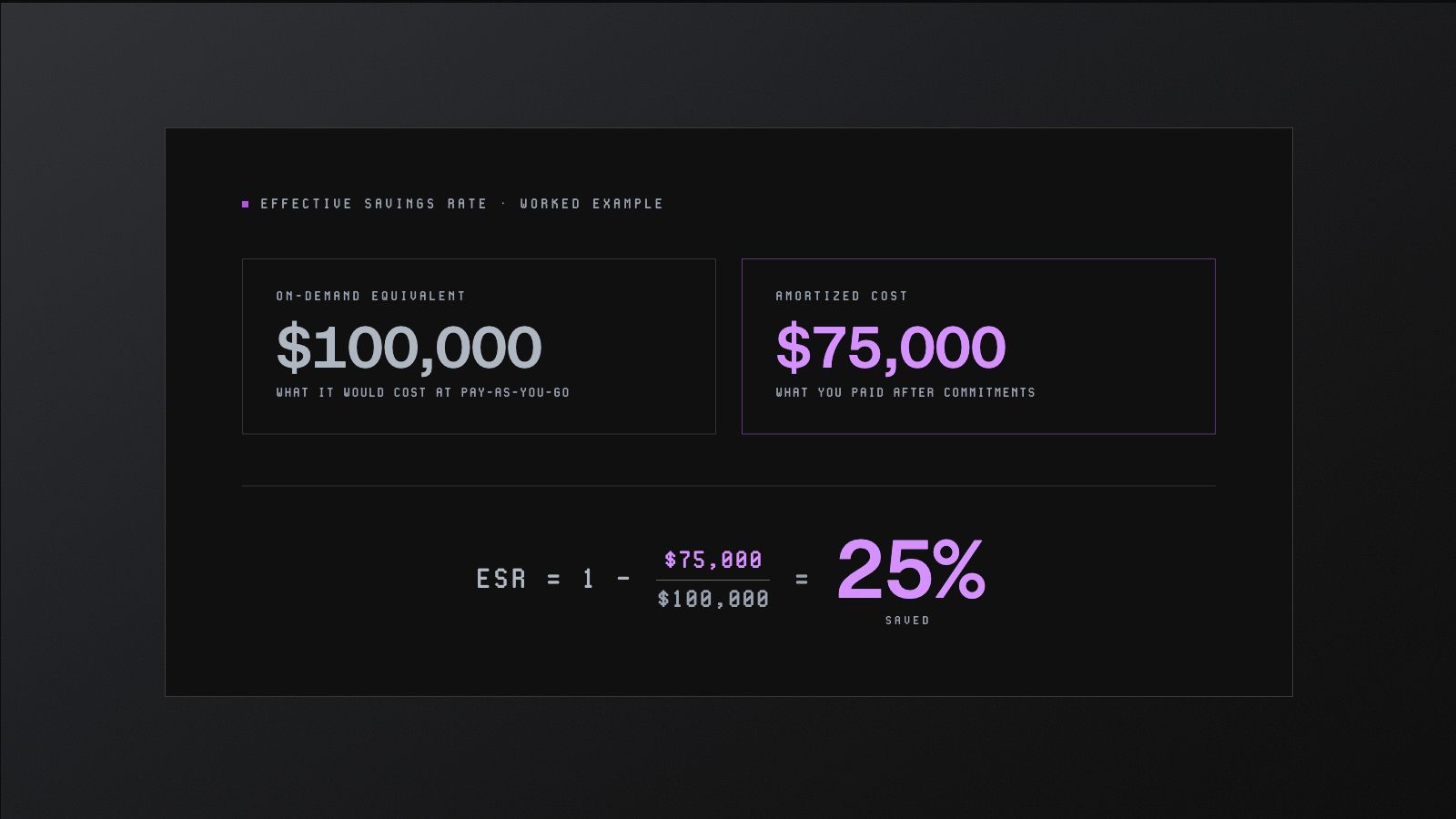
A worked example of Effective Savings Rate: $100,000 on-demand equivalent versus $75,000 amortized cost, giving an ESR of 25%.
Say the same cloud usage would have cost $100,000 on-demand. After your commitments apply, the bill comes down to $75,000.
ESR = 1 − ($75,000 ÷ $100,000) = 25%
So, your commitments saved you 25%.
The number matters most when the result is lower than expected. An ESR of 0% means you are still paying the regular rate. If it drops below 0%, your “discounts” are costing more than on-demand pricing would have.
That usually points to commitment spend your workloads are no longer using.
How should you calculate ESR across your environment?
Start with one reporting period, such as a month, and keep the comparison consistent.
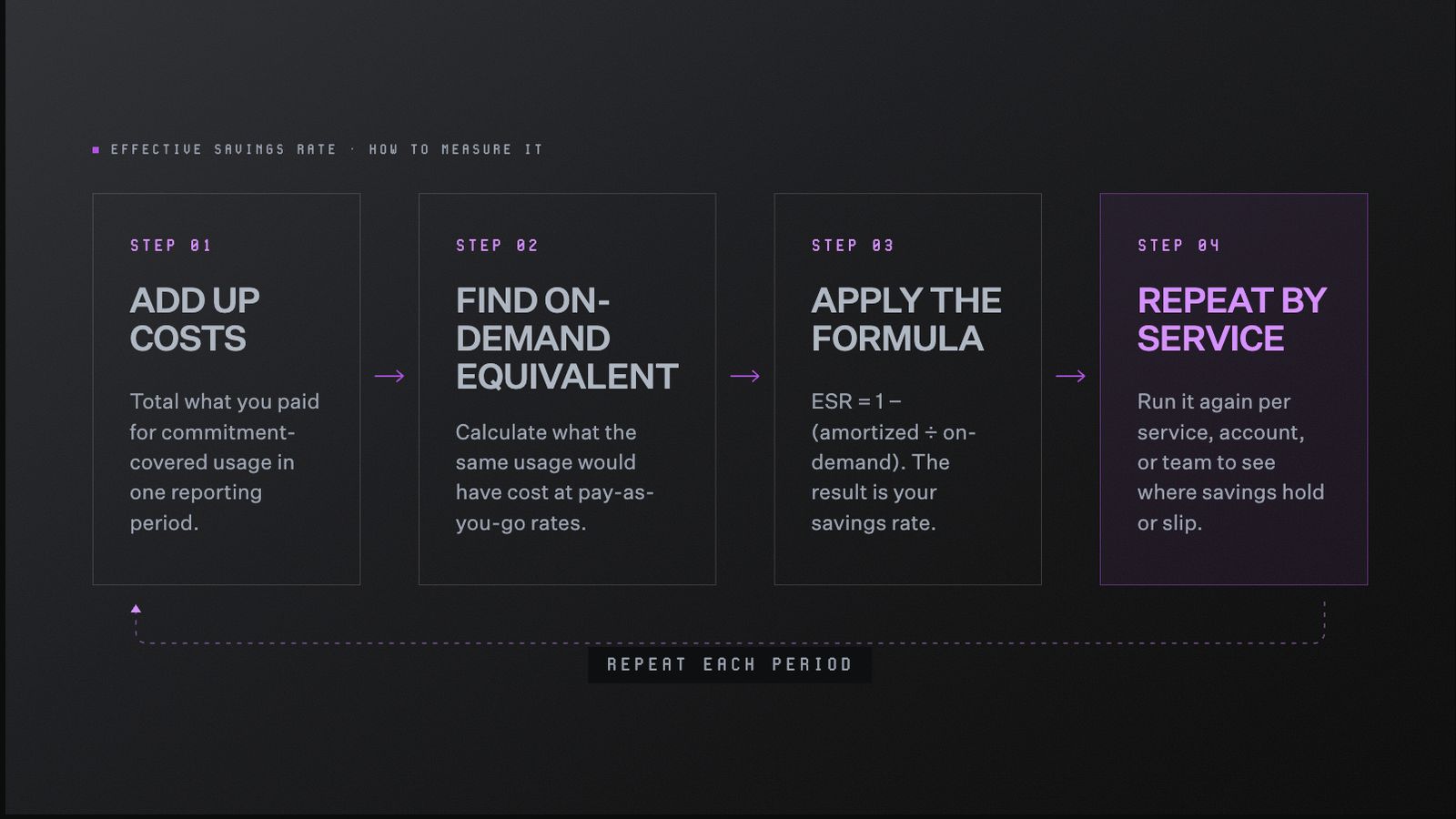
A four-step process for measuring Effective Savings Rate: add up costs, find the on-demand equivalent, apply the formula, then repeat by service, account, or team each reporting period.
Then:
- Add up what you paid for commitment-covered usage.
- Calculate the on-demand cost for that same usage.
- Apply the formula.
- Repeat the calculation by service, account, or team.
That final step matters because one company-wide percentage can smooth over very different results.
Your compute commitments could be performing well while database usage remains mostly on-demand. Looking at ESR by service shows where your strategy is working and where savings are slipping through.
How Effective Savings Rate compares with coverage and utilization
Your coverage, utilization, and ESR all tell you something useful, but they are not interchangeable.
Each metric answers a different question:
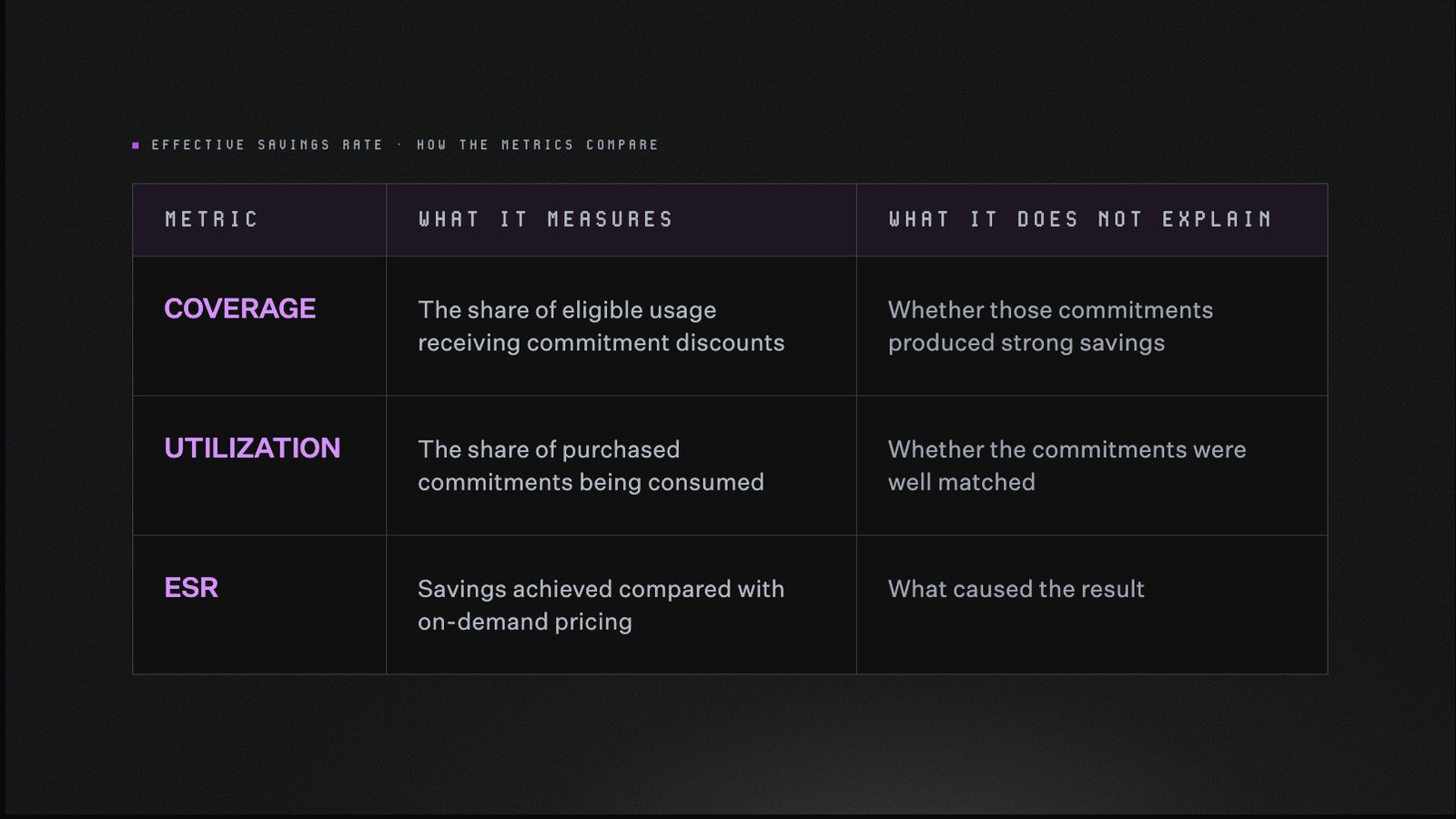
A comparison of coverage, utilization, and ESR: what each metric measures and what it leaves unexplained.
Coverage shows how much usage is discounted
Coverage tells you how much of your cloud usage is covered by commitments.
Low coverage means more of your usage is still paying the regular rate. High coverage sounds better, but the real question is whether those commitments are delivering meaningful savings.
Utilization shows how much of a commitment is used
Utilization looks at the commitment itself.
A low utilization rate means part of it is going unused. A high rate means the commitment is being consumed, but that alone does not prove it was the right purchase. You can nearly use an entire commitment and still save less than expected.
Effective Savings Rate shows the financial outcome
Once coverage and utilization are clear, ESR brings the financial result into focus.
A lower ESR often points to:
- More usage paying on-demand rates
- Commitments going unused
- Workloads changing from what you originally purchased
That is why ESR works best alongside the other two metrics. Together, they show both: the result and what is driving it.
Best practices for improving your Effective Savings Rate
Improving ESR isn’t about buying more commitments. It’s about covering the usage you can rely on, then keeping those commitments aligned as your environment changes.
Start with usage you can count on
Look at your recent usage and find the level that stays fairly consistent.
That steady baseline is the safest place to begin. Temporary spikes, seasonal demand, and expected growth are harder to predict, so they are usually better left on-demand at first.
This gives you room to save without committing to usage that could disappear.
Add coverage where the pattern is clear
Once you know your baseline, look for stable usage that is still paying on-demand rates.
Good candidates usually have:
- Consistent usage
- Predictable spending
- Limited seasonal changes
- No major migration planned
You do not need to cover every eligible workload. Start with the usage that has stayed steady over time, where the commitment is more likely to keep delivering value.
Keep an eye on what you already bought
A commitment that worked six months ago might not fit today.
That can happen when:
- Usage drops
- Workloads move to another region
- Teams switch instance families
- One service replaces another
The important part is what happens next. The commitment stays in place even when the workload changes, so you can end up paying for capacity you no longer use.
Checking utilization early can help you spot commitments you are still paying for but no longer fully using.
Leave yourself some flexibility
Longer commitments usually come with bigger discounts. They also give you less room to change course.
For a steady workload, the bigger discount can be worth it because you are more likely to keep using what you bought.
For an environment that changes often, flexibility matters more. A smaller discount can still lead to better savings if it helps you avoid paying for commitments that no longer fit your usage.
Measure ESR by service and account
Your company-wide ESR combines savings across every service. That gives you a useful overview, but it does not show how each service is performing.
For example, your compute usage could have a 50% ESR while your database usage sits at 5%. If compute makes up most of your spend, the company-wide number can still look strong. Looking only at that average would make the weaker database savings easy to miss.
Break ESR down by:
- Cloud provider
- Service
- Account
- Team
- Environment
This helps you find the specific areas where more usage is still paying on-demand rates or commitments are not delivering enough savings.
Diagnose changes with supporting metrics
When ESR moves, coverage and utilization help you understand why.
- Coverage shows whether more usage is paying on-demand rates.
- Utilization shows whether part of a commitment is going unused.
- ESR shows how those changes affected your savings.
You do not need to chase the highest possible number. The goal is a savings strategy that still makes sense as your infrastructure changes.
Know when a higher ESR is not the priority
Some workloads simply work better without long-term commitments.
That includes:
- Nightly or batch jobs that only run for a few hours
- Temporary development and testing environments
- Autoscaling workloads that grow and shrink throughout the day
- Spot workloads that trade guaranteed availability for a lower rate
You can also lower your cloud bill in ways ESR will never show, such as:
- Rightsizing oversized resources
- Scheduling non-production environments to shut down
- Removing idle infrastructure
So, a lower ESR is not always a warning sign. Sometimes it means the workload already has the flexibility it needs, and forcing more commitment coverage would only make the economics worse.
How North helps improve your Effective Savings Rate
ESR can tell you that savings slipped. The harder part is figuring out why.
Maybe more usage moved back to on-demand pricing. Maybe a commitment is no longer being fully used. Or maybe one service is performing well enough to hide a weaker one.
North brings those clues into one place, so you can understand what changed and decide what to do next.
Use North’s FinOps Score to understand your ESR
A raw ESR percentage can be surprisingly hard to judge.
A 30% rate might be strong for one service and leave room for improvement in another. That is because every cloud service comes with different pricing and discount options.
North translates ESR into a service-specific FinOps Score:
- 0: No rate optimization activated
- 1: Poor
- 2: Fair
- 3: Good
- 4: Great
- 5: Elite
Instead of asking whether one percentage is “good,” you can quickly see how each service is performing against its own savings potential.
Explore our guide to North’s FinOps Score for a closer look at how the scale works.
Ask Noros what changed
When ESR drops, the answer is rarely sitting in one neat report.
You might need to compare coverage, utilization, recent usage changes, and commitment details before the pattern becomes clear. Noros, North’s FinOps Agent, lets you skip some of that digging and ask the question directly.
Try asking:
- “Why did our ESR decline this month?”
- “Which services have the most room to improve?”
- “Where is uncovered usage increasing our costs?”
- “Which commitments no longer match current usage?”
- “How can we improve ESR without overcommitting?”
That turns ESR from a number you notice into something you can investigate and act on.
Keep commitments from falling behind your usage
Cloud usage has a habit of changing after the commitment decision is made.
Teams grow, workloads move, and instance families change. The forecast that looked solid six months ago slowly stops matching reality.
North supports two ways to keep coverage closer to what you are running:
- Flexbot gives teams discounted rates with month-to-month flexibility. Coverage can move with usage, rather than depending on one large commitment decision.
- Autobot manages commitments through smaller monthly purchases. It models usage and follows the goals, flexibility preferences, and guardrails set by the team.
Both approaches take some of the upkeep out of commitment management. They help teams:
- Cover more stable usage
- Adjust as demand grows or shrinks
- Avoid paying for commitments that no longer fit
- Protect utilization over time
- Improve savings without overcommitting
North helps your commitment strategy keep pace with the way your infrastructure changes, so yesterday’s decisions do not quietly drag down today’s savings.
See what your Effective Savings Rate looks like in North
Your ESR is easier to improve once you can see what is shaping it.
North brings the score, the supporting metrics, and the next steps into one place. You can compare performance by service, ask Noros what changed, and see where commitment coverage has fallen behind your usage.
Explore your Effective Savings Rate with North’s free tier today.